Elevating Accessibility and Translation Handoffs for Kijiji’s Flutter App
Design Lead
Design Ops
2024
This case study outlines how I took the initiative to improve design ops for accessibility of the Kijiji's new Flutter app. The initiative shows how we incorporated ways to meet various legal standards for accessibility and how we've improved the way we hand off projects between UX and Tech teams for our Flutter app.
Introduction
Kijiji caters to a diverse range of users, including those with different abilities and language preferences. Our project aimed to make our app not only easier to use but also fully compliant with the latest accessibility and bilingual requirements. Our main goals were to:
Meet legal accessibility standards
Align with accessibility legal requirements including the Web Content Accessibility Guidelines (WCAG), the Accessibility for Ontarians with Disabilities Act (AODA), and app store accessibility policies.
Make our app easier for users with assistive technologies.
Provide full support for both English and French.
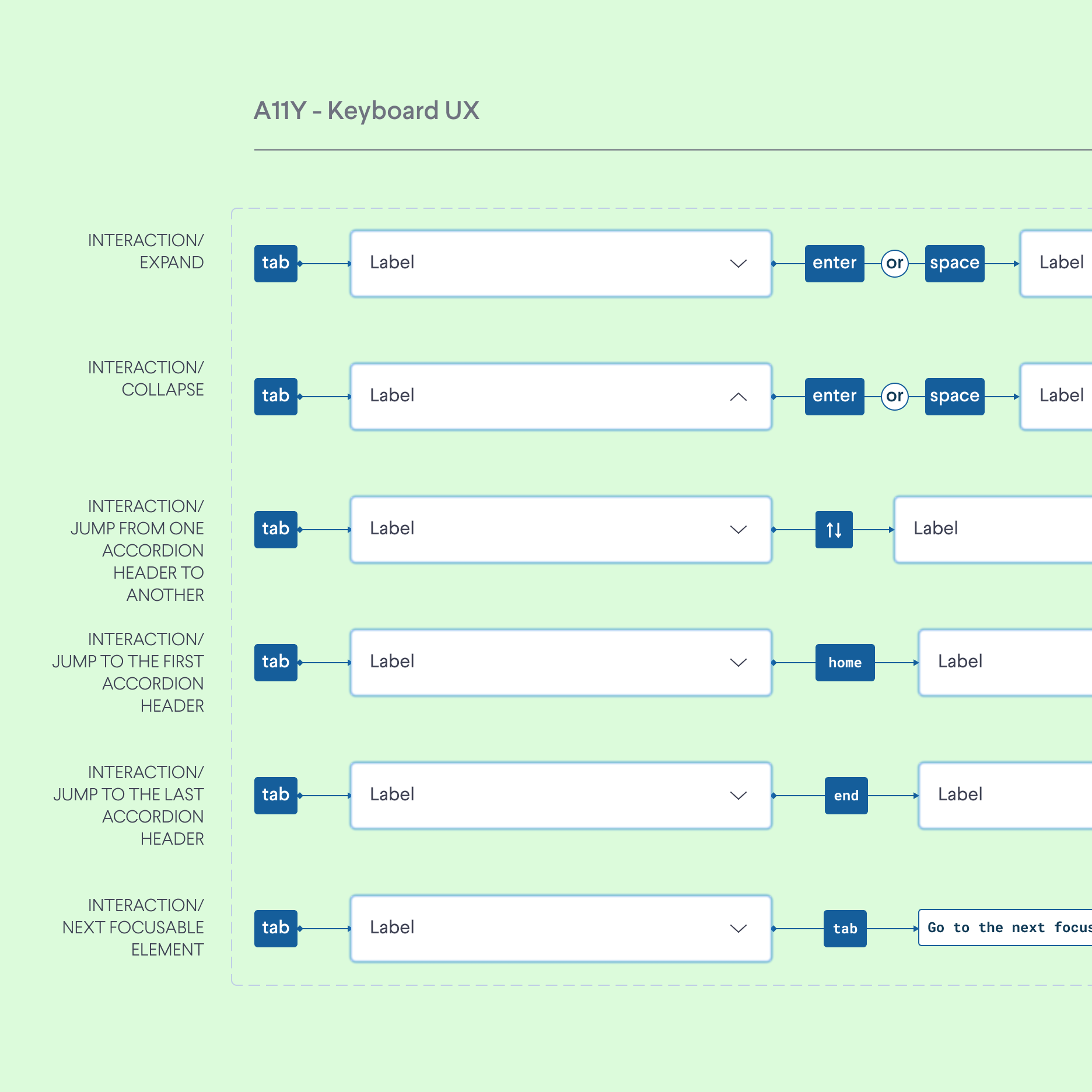
Streamline the handoff process between UX and tech teams to include A11Y specs in each design iteration.
Below are the slides that I presented to the Head of Mobile on why we need extra efforts and dedicated story points in our sprints for accessibility related work. These slides were the starting point of this initiative that I lead.
Legal and Ethical Considerations
Kijiji is dedicated to all users, including those who use assistive technologies like VoiceOver and TalkBack. Meeting legal standards such as WCAG 2.1, AODA, and app store policies is crucial for us, but we also saw it as our ethical duty. Our initiative intended to go beyond mere compliance, aiming for an exceptional user experience for all users with the new Flutter app.
Challenge
The existing process for design and development handoff at Kijiji lacked a systemized approach and synchronization, particularly in the areas of A11Y and language translation. This led to inconsistencies and potential delays in development and as devs did not have access to the right file at the right time which included translations for a specific screen in the design handoff.
This challenge and gap in the design team's handoffs led to increasing design debt for accessibility which in turn led to negative feedback from our users with accessibility needs.
Solution
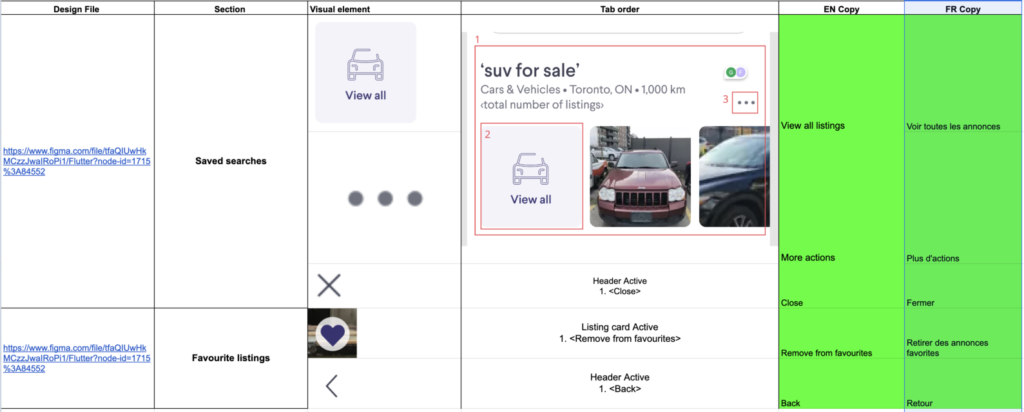
To address this, a folder structure was established on Google Drive, where each project(epic) had its own folder with Excel sheets that listed accessibility details and translations. Our decision to create folder hierarchy based on the epics in our sprints was because the teams were structured in pod systems. These pods were each responsible for their epics whereas, the design team worked as a shared service between these teams. These folders included excel sheets which were meticulously crafted to include:
Visual elements and their respective A11Y labels and instructions.
Direct links to the Figma design files for reference.
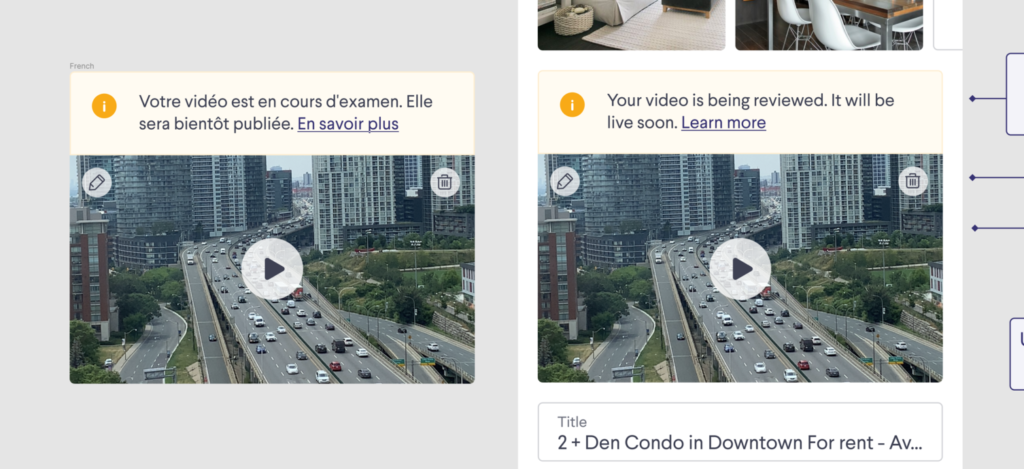
English and French translations of all UI copy, considering character overflow to maintain UI integrity.
Additionally, a utility title bar(in the figma file) for design handoffs was created, which served as a standardized template for designers to include essential information such as:
The title indicating the subject of the A11Y and translation documentation.
Designer attribution to maintain responsibility and traceability.
A hand-off date to track progress and deadlines.
The New Process
The design team was responsible for coordinating with marketing and product teams to ensure timely documentation of translations and labels.
Which were then integrated and tested in the UI.
Upon finalization, these specifications were attached to Jira tickets.
The links to excel sheets were linked in the title bars of the design handoff for the development team to review the translations.
The initiative brought about a more streamlined and efficient handoff process. Developers had access to the right labels and their translations for the actionable elements in our designs. By leveraging semantics widgets in Flutter, such as SemanticsNode, MergeSemantics, and ExcludeSemantics, developers could customize assistive technology experiences with hints, read orders, and descriptions as detailed in the handoff documents. This provided me an opportunity to learn about the semantics tree on flutter apps.
Outcome
The new handoff process has led to:
Increased efficiency in development cycles due to clear and accessible documentation.
An easy cross-finctional collaboration of Design & Marketing(Shared services) with tech pods.
A notable improvement in the app’s A11Y score, reflecting a better user experience for individuals with disabilities.
Positive feedback from both English and French-speaking users regarding the app’s usability.
The establishment of a robust framework that can be iteratively improved as A11Y standards evolve.
Conclusion & Future Directions
Implementing a structured design and development handoff process has made our app more inclusive and compliant with regulations. It has improved the app’s functionality for users needing assistive technologies and has made integrating bilingual content smoother.
Continuing this initiative,
We aim to leverage data analytics to further refine our A11Y features and bilingual offerings, remaining responsive to the evolving landscape of user needs and legal requirements provincially and federally.
We will continue to iterate on our processes and welcome feedback from users and stakeholders to drive continuous improvement.